Don't retype it,
Just right click it.
Why type the same thing again and again? Stash the boring stuff safely, and paste it instantly with a simple right-click.
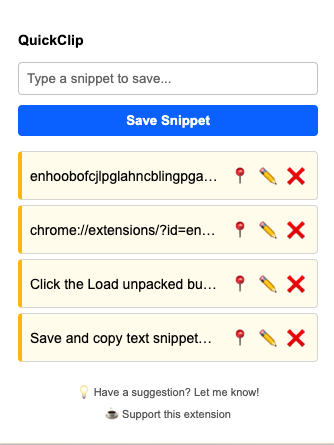
live on any page
Why type the same thing again and again? Stash the boring stuff safely, and paste it instantly with a simple right-click.
Developers reusing commands, writers reusing lines, support agents answering the same question for the fifth time, researchers tracking sources — different copy, same habit of losing it the moment something new gets grabbed.
Stop losing your most important snippets. Manually stash the text, links, or code you actually want to keep. They stay safe in your list, waiting for you.
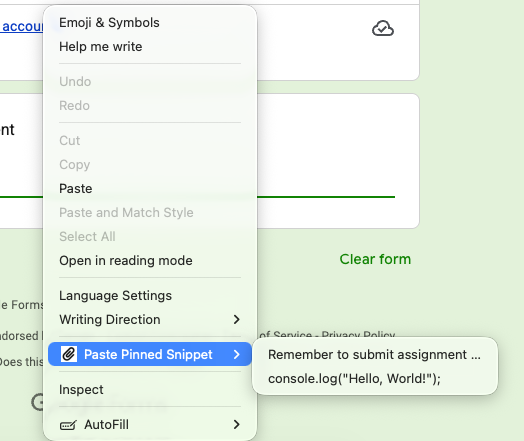
Right-click any text field and pick from your history, with a live preview before you click. No alt-tabbing back to find what you just had.
Reach for something constantly? Pin it to the top so it never gets buried. Catch a typo? Edit it right in the popup — no menus to hunt through.
Copy text, links, or code the way you always have — Ctrl/Cmd+C. Open QuickClip extension and then save it.
Open the popup any time to see your full history. Pin anything you'll need again so it stays put at the top.
Right-click any text field and pick what you need to paste from the pinned clips. Done — back to what you were doing.
Start free. Upgrade only if you outgrow a 5-item history — no subscription, ever.
QuickClip is in it's MVP phase. More useful features are in the pipeline. For now there's no checkout page yet — Pro is switched on by hand. Here's exactly how that works.
Send a one-time $5 payment to https://paypal.me/rudra754 — the person you reach is the person who built QuickClip.
Screenshot your payment confirmation and email it to merudra.official@gmail.com .
You'll get a personal activation code back by email, usually within a few minutes. Paste it into your QuickClip extension and Pro turns on right away.
Stop retyping the same text, links, or code. Stash your repetitive snippets once and paste them instantly from your right-click menu.
Add to Chrome